Operational dashboards that laboratory managers can act on
Learn how to design actionable laboratory dashboards that highlight pending work, TAT risks, quality exceptions and interface issues with clear ownership, escalation and drill-down visibility.
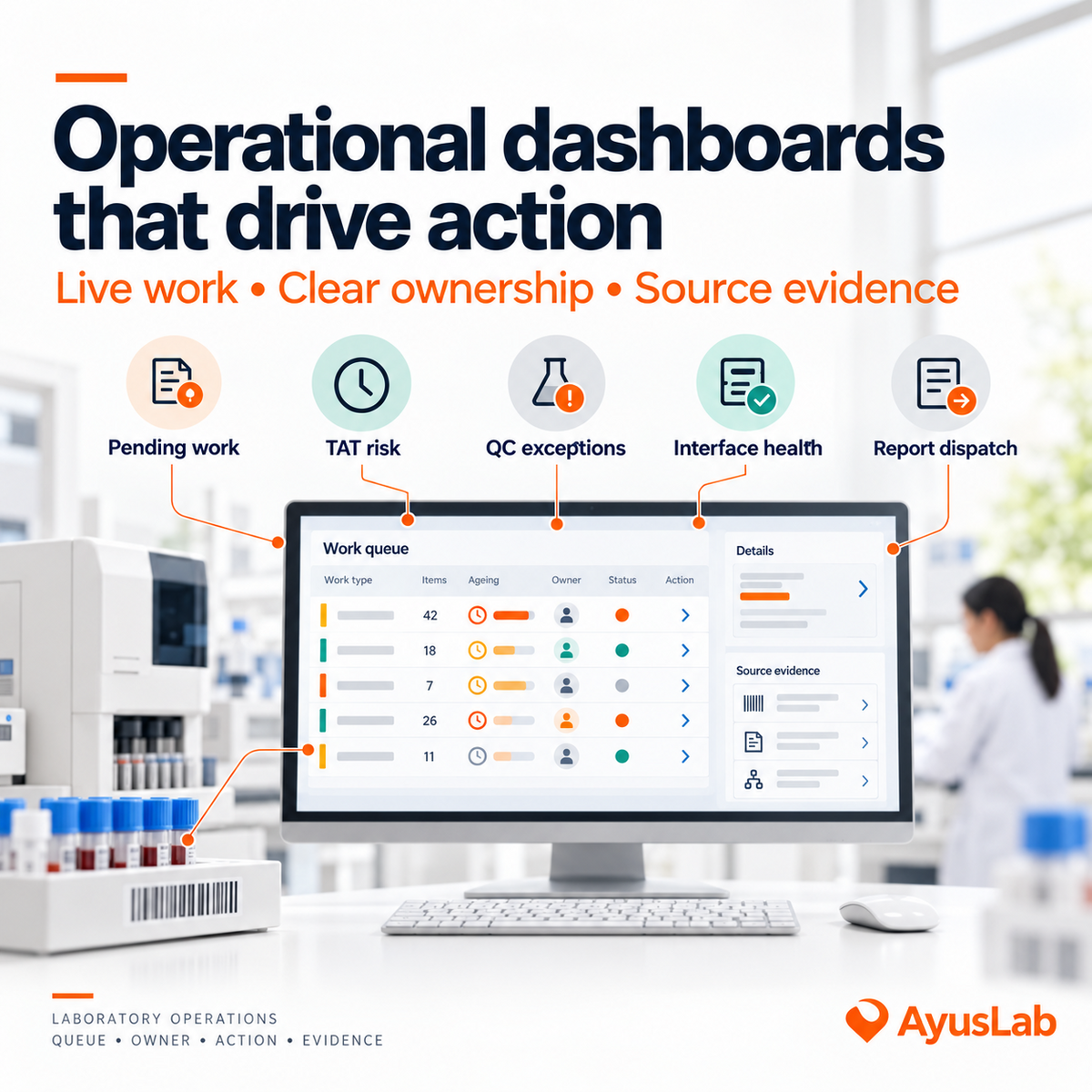
A dashboard is not useful because it contains more metrics. It is useful when a laboratory manager can see what needs attention, understand why it matters, identify who owns the next step and open the underlying record.
This separates an operational dashboard from a management report. A management report may show last month's turnaround-time performance or rejection rate. An operational dashboard should reveal the samples approaching delay, the interface queue that stopped moving or the authorised results that failed to reach their destination. One supports retrospective review; the other supports intervention while work is still recoverable.
ISO 15189:2022 establishes requirements for medical laboratory quality and competence. In India, NABL 112A identifies areas such as sample collection, transportation, analysis, reporting, turnaround time, complaints, process downtime and PT/EQA performance for quality monitoring. Laboratories should translate applicable requirements through their workflow, approved procedures and local obligations.
1. Define the decision before the metric
Begin each dashboard element with a management question: What action could this information trigger? If no practical decision follows, the measure may belong in periodic analysis rather than on a live operational screen.
Every actionable element needs five parts:
- a precise definition and data source;
- a time window or ageing rule;
- an accountable role;
- an escalation condition; and
- drill-down to the orders, samples, runs, messages or reports behind the number.
A tile reading “127 pending provides little direction. A queue showing “12 specimens awaiting receipt beyond the approved route window, owned by Collection Logistics creates a starting point. Colour should indicate defined status, not decorate a number. The laboratory must approve what normal, warning and exception mean for each workflow.
2. Show pending work by stage and age
Pending work is rarely one queue. An order may be awaiting collection, a specimen may be in transit, a received sample may not be accessioned, testing may be incomplete, a result may await technical review or an authorised report may await dispatch.
An effective view separates these stages and shows age, priority, location, reason and owner. Staff should be able to filter to the work they can influence and open the source record without recreating the search elsewhere.
Define the timestamps behind every state. "Received" might mean arrival at the building, scanning at accession or acceptance after suitability review. If locations use different events, their queues and turnaround measures cannot be compared reliably. Paused or excluded periods must also follow the laboratory's approved rules rather than being silently removed.
Reason codes make the queue more useful. Examples include sample not received, insufficient quantity, analyser unavailable, repeat required, referral pending, clinical information requested and authorisation pending. Free text can add context, but it should not replace controlled categories needed for monitoring.
3. Highlight turnaround risk before breach
A retrospective TAT percentage cannot rescue today's delayed sample. The operational view should distinguish work that is on track, approaching its target and already outside the approved target. It should also show the workflow stage consuming the time.
TAT needs explicit start and end events by test, priority and service model. NABL 112A defines turnaround time as elapsed time between two specified points across pre-examination, examination and post-examination processes. A dashboard should therefore state whether it measures collection to report, receipt to authorisation, authorisation to dispatch or another approved interval.
Managers need the exception list beneath the summary: affected test, current stage, time remaining or overdue, location, hold reason and responsible team. Clinical priority may influence escalation, but the software should apply laboratory-approved categories rather than invent universal clinical thresholds.
4. Bring QC and quality exceptions into view
Operational quality views can include unresolved internal QC failures, runs held from release, pending lot verification, specimen rejections, transport exceptions, recollection requests, corrected-report actions and open nonconformities. The purpose is not to reduce these different events to one quality score. It is to ensure that an unresolved exception has an owner and does not disappear between systems or shifts.
QC status should link to the relevant analyser, test, control material, lot, run, review evidence and authorised action where applicable. A dashboard flag cannot decide that an analytical system is acceptable, release patient results or replace the laboratory's QC rules.
Trend indicators remain important. Rejection rates, repeated QC failures or recurring correction reasons may reveal process weaknesses. Keep their definitions and denominators visible so users can distinguish a genuine rate change from a change in volume or recording practice.
5. Monitor interface health as workflow health
An interface can be technically connected while work is failing. A useful dashboard should look beyond a green connection indicator to show message flow and unresolved exceptions.
Depending on the architecture, relevant views may include analyser or system connection status, last successful exchange, messages queued, rejected or unmatched results, duplicate transmissions, orders not acknowledged and manual fallback currently in use. The manager needs to know which section and work items are affected, not only an error code.
Technical logs should remain available for support teams, while the operational view translates them into laboratory impact. NABL 112A calls for verification of analyser - LIS and LIS-HIS interfaces so that data are transmitted as intended and results are not misfiled. Monitoring should help expose a failure; it does not replace initial and change-related interface verification.
6. Separate authorisation from dispatch
Result production, professional authorisation and delivery are different events. Combining them into completed can conceal work that has passed analysis but has not reached the intended recipient.
An authorisation dashboard can show results awaiting review by section, age, priority and assigned authoriser. A dispatch dashboard can show authorised reports queued for delivery, failed portal or message delivery, print queues and other approved channels. Critical-result communication should remain a separate closed-loop process with recipient, acknowledgement and escalation records; ordinary report dispatch is not evidence that urgent communication occurred.
Corrected reports and addenda may also require confirmation that the changed information was communicated. The dashboard should link to the version history and communication record rather than presenting only the latest report status.
7. Compare branches only with common definitions
Branch comparison is valuable when it reveals where support or investigation is needed. It becomes misleading when locations record different start points, serve different test mixes or use different denominators.
Compare measures such as pending age, defined TAT performance, rejection rate, dispatch failure, downtime or unresolved exceptions only after standardising event definitions and exclusions. Show both the rate and its denominator. A branch with one rejection among ten specimens should not be interpreted like a branch with ten among ten thousand.
Use drill-down to separate volume, case mix, transport model, referral work and local operating conditions. The aim is not a simplistic league table. It is to identify a pattern, examine source records and decide whether the cause is local, network-wide or a measurement problem.
8. Establish ownership and a review rhythm
Different dashboards serve different rhythms:
- During the shift: live queues, TAT risk, QC holds and interface exceptions.
- Daily: unresolved work, dispatch failures, carry-forward items and ownership.
- Weekly: recurring reasons, branch patterns, ageing and resource constraints.
- Management review: defined quality indicators, trends, risks, actions and effectiveness.
Every exception should move toward acknowledgement, assignment, action and closure evidence. Escalation should be proportionate and time-bound. Too many alerts teach users to ignore the screen; too few hide risk. Review which alerts led to action and remove or redesign those that consistently add no value.
NABL guidance expects information systems to support workflow, quality and audit trails and calls for quality indicators covering relevant laboratory processes. The laboratory should retain definitions, configuration changes, acknowledgements, actions and review records so that the dashboard itself remains traceable.
Where a LIMS can support visibility
Subject to product-owner verification of current behaviour, AyusLab may support stage-based pending views, timestamps, reason codes, TAT monitoring, QC or workflow flags, interface-status visibility, authorisation and dispatch queues, location filters and links to source records. Comparative views may help managers examine consistent definitions across branches when the underlying data are configured correctly.
A LIMS can make operational evidence visible and route attention. It cannot define the laboratory's priorities, judge analytical acceptability, interpret clinical significance or close an exception without authorised professional action.
The design principle is: show the work at risk, the reason, the owner and the record needed to act.
Frequently asked questions
What is the simplest definition of operational dashboards that laboratory managers can act on?
They are live, defined views of laboratory work and exceptions that identify what needs attention, who owns the next step and which source records support the decision.
Which part of the laboratory workflow is responsible?
Ownership depends on the stage: collection, accession, analytical sections, quality, authorisation, dispatch, interface support or branch operations. The dashboard should identify the responsible role for each exception rather than assigning everything to one manager.
What records should remain available for review?
Keep metric definitions, timestamps, status and reason histories, alert configuration, source records, acknowledgements, assignments, actions, escalations, closures and management-review evidence according to approved retention requirements.
Where can a LIMS help and where is professional judgement still required?
A LIMS can assemble queues, calculate approved time intervals, highlight exceptions and provide drill-down. Laboratory professionals must define the rules, assess analytical and clinical context, authorise actions and review whether interventions were effective.
Reviewing your own lab's processes?
A Lab Growth Session walks through your turnaround time, rejection rates and workflow with our team.
Book a Lab Growth Session